Should Car Dealers Watermark Photos on Marketplace?
Usually not. On Marketplace, a logo across the photo makes the one image buyers see in the grid look like an ad, and it won't stop anyone copying it. Meta's own guidance for vehicle listings discourages text on images, so if you want your name on a photo, use one short banner at the edge, sparingly, or none. Never put payment terms on a photo.
Search this and you get a dealer forum, a vendor, a 2014 photographer's blog, a vendor selling overlays, an agency, a free overlay tool and an eBay forum. Plenty of opinions. None of them gets specific about Marketplace, where your photo is a small square in a grid, next to a price, on a phone.
That square is the test here: what each option does to it, and to the buyer looking at it. If you'd rather see a banner on one of your own photos first, the free AI car photo editor adds one to a studio shot of your vehicle. There's no sign-up for the preview.
What are your three options on a Marketplace photo?
Stamp a watermark on it, put a banner above or below the vehicle, or leave it clean.
| Option | What it is | What it does in the grid tile | Where it falls down |
|---|---|---|---|
| Watermark | A logo or name over the photo, often see-through, often across the vehicle. | Puts a mark on the one thing in the tile that should be clean. | It hides part of the unit, and a small corner mark is easy to crop or erase. |
| Banner | A solid bar of text across the top or bottom of the photo. | Sits at the edge of the photo, so the vehicle can stay clear. | Long text loses its ends in the square crop. |
| Nothing | The photo as shot, or with the background cleaned up. | The vehicle, alone, next to the price. | No branding on the photo. Your name lives in the listing. |
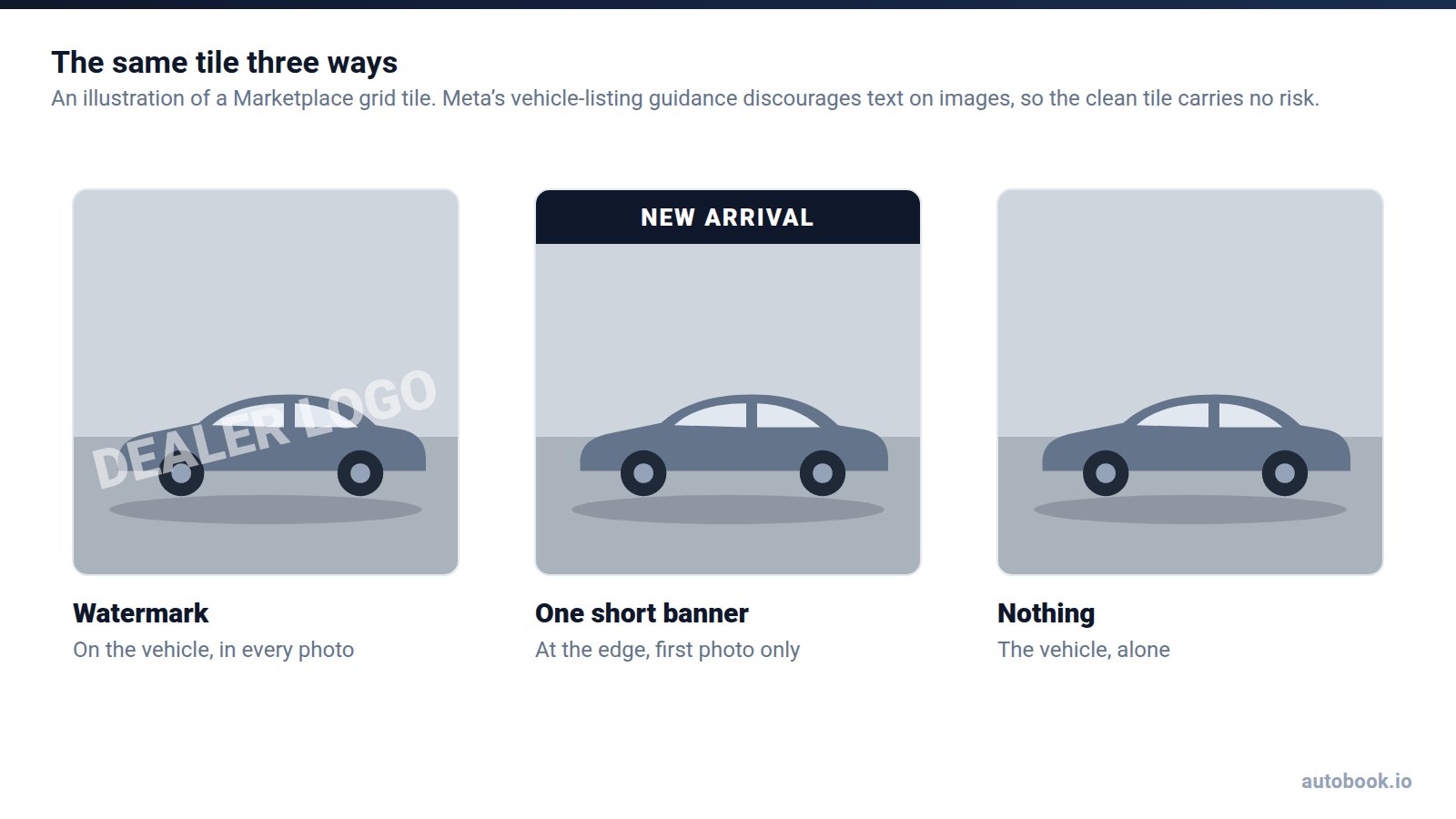
Our pick for most reps is nothing, or at most one short banner on the first photo, for the reason in the next section. It's the same reasoning that says to remove the dealer plate frame. Our photo editing guide calls the frame "an ad for the store stuck on the one photo that should be about the vehicle," which is why it comes off. A watermark is that ad, bigger, and on top of the vehicle.
A buyer scrolling the grid decides at a glance. A logo tells them it's a dealer ad before they've looked at what's for sale. Being a dealer isn't the problem. Say in the listing that you're a salesperson, because buyers screen for it and saying so up front works in your favor. The photo's job is the vehicle.
Does Facebook allow text or banners on vehicle photos?
The clearest thing Meta has published points one way. Its developer documentation for Marketplace Vehicles says: "Images with banners, text or placeholder images are generally not allowed, and may be banned." It also asks for images that show the actual vehicle.
Be precise about where that line lives. Those pages are written for dealers and partners who send inventory to Marketplace as a feed. Facebook's Commerce Policies, which cover the listings you post from your own profile, don't include a photo checklist that we could find. So it isn't a rule we can point to for your listings. It is Meta telling vehicle sellers what it would rather not see, and that's worth taking seriously.
That's why our advice is restraint. A clean photo carries no risk here at all. A watermark across the vehicle is the thing that guidance describes most plainly. A single short banner on the first photo sits in between, and if you'd rather not take the chance, leave it off and let the listing do the talking.
What does a watermark actually protect you from?
Copying, in theory. Fake vehicle ads need photos of a vehicle the scammer doesn't have, and a dealer listing is a full set of real ones, in public, free to save. How those scams run, and how to report a copy of your listing, is in the Marketplace scams that target sellers.
A watermark doesn't stop any of that. A logo in the corner crops out in one move. Some phones have an object eraser built in, and it can take a small mark out of a corner the way it takes a plate off a bumper. A logo across the middle of the vehicle is harder to remove. It's also across the vehicle for every real buyer.
And a copy that keeps your logo doesn't protect anyone. It tells the person who got scammed which store to call. That's usually how a store finds out, according to our scams guide: an angry call about a deposit nobody there ever took.
What a watermark does do is mark the photos as yours. If that matters to your store, a banner does the same job without covering the vehicle.
What should never go on a car photo?
Whatever format you pick, some things stay off the photo:
- Payment or down-payment figures. "$349 a month", "$2,500 down" or "72 months" on a photo advertises credit. Under Regulation Z, those are triggering terms (12 CFR 1026.24). The list covers the amount or percentage of a down payment, the number of payments or the repayment period, and the amount of any payment. Use one and the ad must also state the down payment, the terms of repayment and the annual percentage rate. A photo has no room for that. Your store's compliance people have the last word on wording, not us.
- A price that doesn't match the listing. Facebook's Commerce Policies say commerce content "may not contain misleading, violent or hateful products and offers." Two prices for one unit is the plainest kind of misleading. Facebook says listings that break its policies can be rejected or removed.
- Claims you can't back up. "Like new" on a unit with a torn seat. "One owner" you haven't checked. A certification the unit doesn't have. The same policy covers them, and so does the buyer at the door.
A price has one more problem: it goes stale. The listing's price field changes when you edit it. The price in the photo doesn't, because it's part of the picture. So a price banner is a promise to redo the photo every time the price moves, and the day you forget, you're showing two prices.
A phone number is the one people ask about. Our editor's bottom banner offers your phone as its example, and our photo editing guide suggests "TEXT/CALL:" and a number you answer. It's text on the image, so the Marketplace Vehicles guidance above applies to it like any other. Buyers can already message you from the listing, so a number on the photo adds little. Check Facebook's current policies before you put one on every unit.
Should the photo carry your name or the store's logo?
Start with the store's rules. If its advertising policy says the dealership's name goes on anything you post, follow it, and put the name in a banner rather than across the vehicle. Your state may have dealer-advertising rules too, and your manager will know them. The listing, and the compliance, are yours.
If the choice is yours, weigh two things. First, the photos probably aren't yours. If they came off the dealership's website, ask before you put your own name on the store's pictures.
Second, your name is already on the listing, because it posts from your profile. Our guide to Marketplace listing titles puts the dealership name in the description, not the title. The same logic works for the photo. Disclose it plainly, just not in the space that has to sell the vehicle at a glance.
How the free editor's banners work
They're text banners: one on top, one on the bottom, or both. There are 8 designs, you pick your own colors, and the text runs up to 24 characters on top and 32 on the bottom. The banners go on the AI photo, which is the same vehicle from the same angle, re-shot in White studio or Turntable. The license plate and plate frame are removed when detected.
Then there's the crop. The editor's output is roughly 4:3, and the Marketplace grid shows a square from the middle. That keeps the full height and trims about an eighth off each side. Both banners stay in the tile; the ends of long text don't. The diagram is in how to edit car photos for Facebook Marketplace. Treat the character limit as a ceiling, not a target.
What goes in one? Short, true, and about the vehicle or how to reach you: NEW ARRIVAL, ONE OWNER if it is, the store's name if the store wants it. One line on the first photo is plenty. A banner on every photo makes the listing read like an ad from the first swipe to the last.
You can preview up to 9 photos a day for free and get 3 full-quality photos a day, the full-quality ones with an email. Interiors, close-ups and photos without a car are turned away. And a studio photo is an AI edit. What Meta's "AI info" label does with that is in will AI-edited car photos get your listing flagged? The short version: the label is a disclosure, and misrepresenting the vehicle is what gets a listing pulled.
How do you brand a whole inventory without a watermark?
With consistency. The best background for car photos makes the case for one spot, used for every unit, so a whole inventory looks like it came from one store. A studio room does the same. So does one banner design, in the same colors, on every first photo. That's house style, and it doesn't cover the vehicle.
Inside autobook.io, the AI Image Processor does this across units. It's the same AI as the free editor, with the same rooms and banners. It's paid and opt-in, at 2 credits a photo, and you pick the vehicles. It processes every exterior on a unit, up to 6, or only the best one. Interiors and close-ups are skipped and not charged. You review each photo against its original and keep it or undo it. autobook.io's founder, John Hozjan, puts the aim in one line: "Improve your inventory photos in a matter of minutes. No experience needed — get the professional photographer feeling without breaking the bank."
The photo is one decision. autobook.io handles the listing around it. It imports your dealership's inventory from its website and writes an editable description for each unit. Then it posts to Marketplace from your own profile, in your own Chrome browser, in batches of up to 50. It can renew listings and cross-post to the Facebook groups you pick. You still choose the units, answer every buyer in Messenger and close, which takes roughly 40 minutes a day. It removes the grind, not the job. Plans from $99/month, and across the network about one in nine posted vehicles sells.
Before you brand anything, put a banner on one of your own photos in the free AI car photo editor and look at it as a tile.
Frequently asked questions
Does Facebook allow watermarks on Marketplace photos?
Meta's guidance for Marketplace Vehicles says images with banners or text are generally not allowed and may be banned. It's written for inventory feeds, and the Commerce Policies for listings you post yourself have no photo checklist we could find. Our advice is to leave watermarks off.
Can I put my phone number on a car listing photo?
Our editor's bottom banner takes up to 32 characters, which fits "TEXT/CALL:" and a number. But Meta's Marketplace Vehicles guidance discourages text on vehicle images, and buyers can already message you from the listing. If you use one, keep it to the first photo.
Should the price go on the photo?
Only if it matches the listing exactly, and only if you'll redo the photo when the price changes. Never a monthly payment or a down payment.
Can I add my dealership's logo with the free editor?
No. The banners are text only: 8 designs, your own colors, up to 24 characters on top and 32 on the bottom. A short store name fits in the top banner.
Do watermarks stop people from stealing car photos?
No. A corner mark crops out, and a mark across the vehicle hurts your own listing more than it hurts a copy. If someone copies your listing, report it to Facebook as a scam.