How to Edit Car Photos for Facebook Marketplace (Free AI Editor)
Edit the scene, never the car. Swap the cluttered inventory row for a clean backdrop, remove the plate and dealer frame, and fix the light. Leave paint, wheels, damage and the whole interior exactly as they are. Put your effort into the first photo, because it's the one that earns the tap in the Marketplace grid.
Most dealer photos don't need a photographer. They need the row of other vehicles, the flags and the plate taken out of the one photo buyers see first. That is an editing job, not a shooting job, and it is the step this article covers: what to change, what never to change, and how to do it for free.
The free tool is our AI car photo editor. Upload one photo, pick a showroom, and you get the same vehicle, from the same angle, in a studio. There's no sign-up for the preview.
What should you edit on a car photo, and what should you never touch?
Three edits are worth making on a dealer photo:
- The background. A unit parked between two others reads as "one of many" in a thumbnail. A clean backdrop makes the vehicle the only subject.
- The plate and the dealer frame. The plate is someone's registration, and the frame is an ad for the store stuck on the one photo that should be about the vehicle.
- The light. Exposure and white balance, so dark paint does not turn into a silhouette and a white truck doesn't glow.
Four are never worth making, whatever the software can do. Do not erase dents, scratches, curb rash or rust. Do not change wheels, paint color or trim. Do not retouch an interior to hide wear. And do not use a manufacturer's stock photo in place of the unit.
The test is not whether AI touched the file. It is whether the buyer who drives in sees the vehicle the photo showed them, in the condition it showed. The edit-by-edit version of that line, and where Facebook's labels come into it, is in will AI-edited car photos get your listing flagged?
Which photo is worth editing?
The first one. Marketplace shows a single photo per listing in the grid, cropped to a rough square from the middle, next to the title and the price. That photo and the listing title decide whether anyone taps. The rest of the set does a different job: it proves the unit is real and answers questions before they turn into messages.
Photo count won't carry the listing on its own, either. We split 802 units sold through autobook.io by how many photos their listings carried. The share selling within 30 days of the most recent post barely moved: 63.6% to 67.2% across every bucket. That result, and how it was measured, is in our study of 30,000 listings and 800 sales.
So fill all twenty, because it costs nothing and the field already does. Then spend your editing time on the first photo: a front three-quarter, pulled clear of the inventory row, which is shot one on the dealer shot list.
How do you edit a car photo for free?
With the free editor, from a phone or a desktop:
| Step | What you do | What happens |
|---|---|---|
| 1. Choose the photo | A whole-car exterior. A front three-quarter works best | Interiors, close-ups and photos without a car are turned away before anything renders |
| 2. Upload it | JPEG, PNG or HEIC, straight from your phone | The page shrinks it before it uploads |
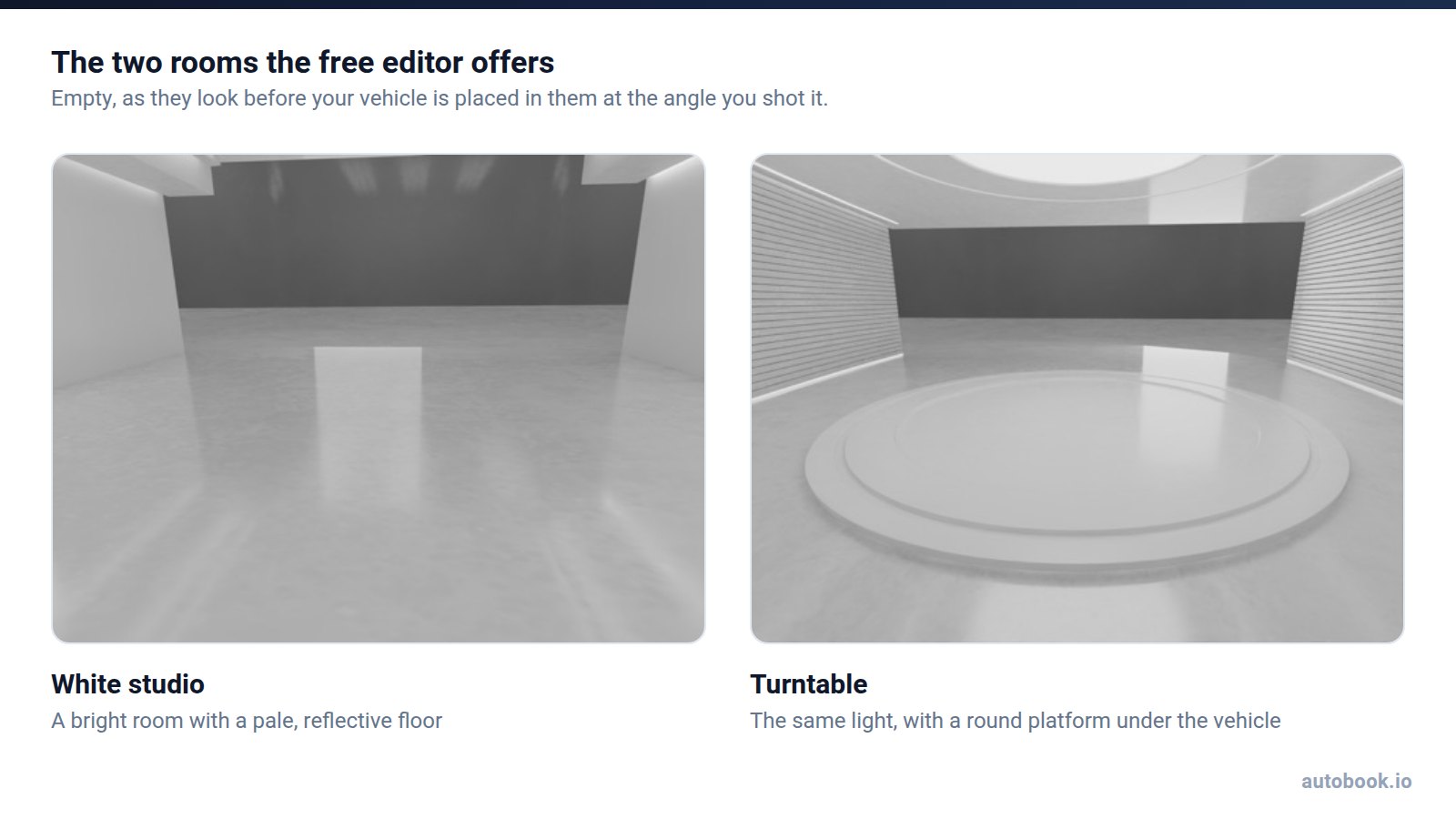
| 3. Pick the room | White studio or Turntable | A free preview renders. Each photo gets up to three, enough to see both rooms |
| 4. Add banners, if you want them | Top and bottom, 8 designs, your own colors | Up to 24 characters on top and 32 on the bottom |
| 5. Process it | Enter an email for the full-quality photo | It waits behind paying customers' photos, usually a few minutes |
| 6. Compare and download | Drag the slider across | Original on one side, AI photo on the other, then download |
You get 9 free previews and 3 full-quality photos a day. The email for the full-quality photo is how autobook.io sends selling tips, and you can unsubscribe any time. autobook.io's founder, John Hozjan, puts what it's for in one line: "Improve your inventory photos in a matter of minutes. No experience needed — get the professional photographer feeling without breaking the bank."
What does the AI actually change?
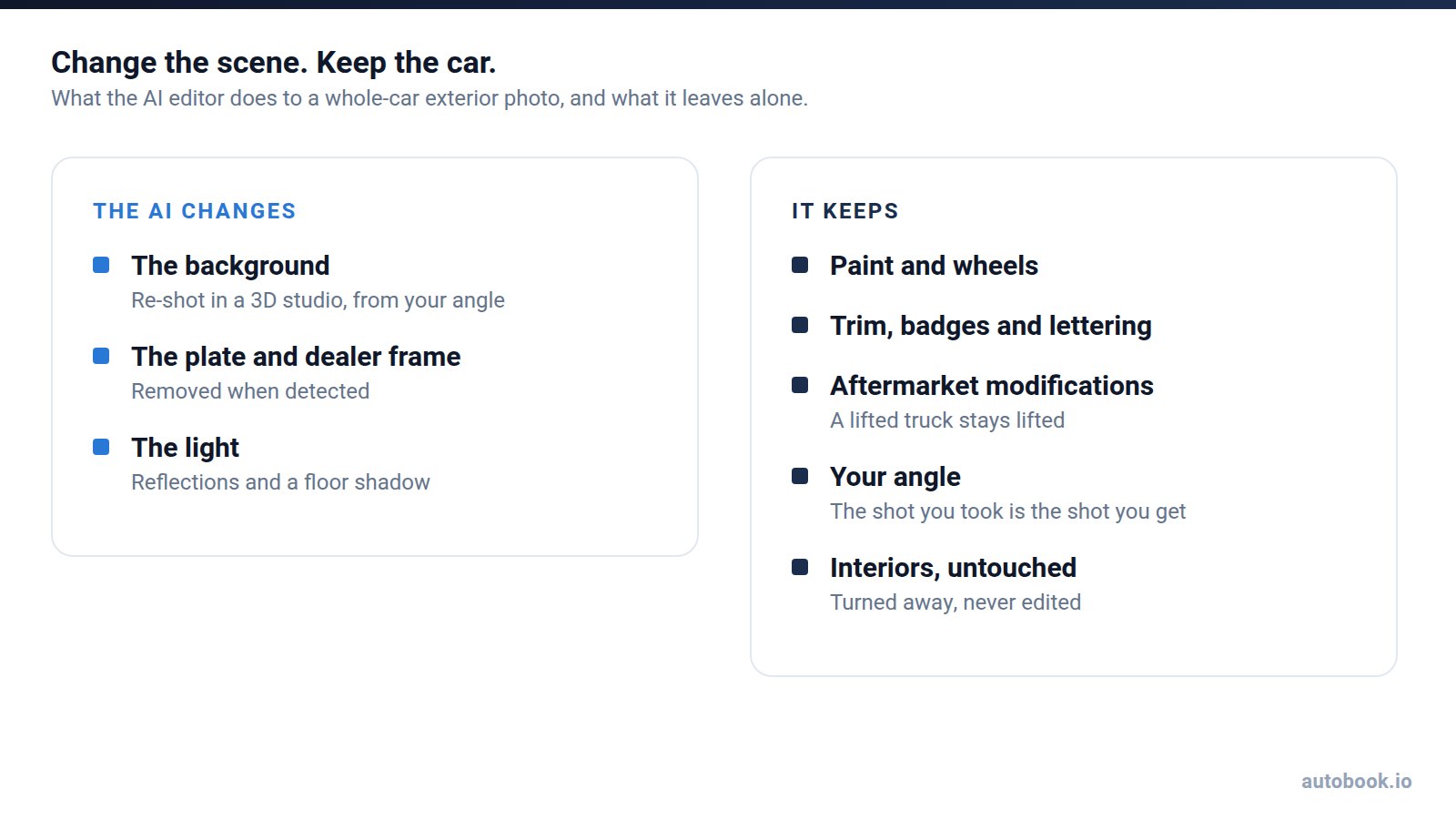
It re-shoots the vehicle in a 3D studio showroom from the photo's own angle, so the angle you shot is the angle you get. It relights it, with reflections and a floor shadow, so the vehicle sits in the room instead of floating on it. And it removes the license plate and the dealer plate frame when it detects them. A plate it misses stays, so look before you post.
What it keeps is the point. Paint, wheels, trim, badges and lettering come through as they are, and so do aftermarket wheels and lifts. It is a re-render of that vehicle, not a generic one of the same model, because a photo of a vehicle you do not have is a misrepresentation no amount of polish fixes.
It also has limits worth knowing before you upload. It keeps your angle, so a shot taken from standing height still looks down on the vehicle, and it cannot invent an angle you did not shoot. And it does not touch interiors. That last one is deliberate: buyers inspect the space they'll sit in harder than anything else, and a retouched interior is what makes them feel lied to at the door.
Should you put a banner on a Marketplace car photo?
Sparingly, and only true things. Treat a banner as a headline, not a sentence: "NEW ARRIVAL" on top, "TEXT/CALL:" and a number you answer on the bottom. That's why the editor caps them at 24 and 32 characters.
Two things never go on a banner. The first is a price that disagrees with the listing. That's the plainest case of what Facebook's Commerce Policies rule out when they say commerce content "may not contain misleading, violent or hateful products and offers." The second is payment terms. "$299 a month" or "$1,000 down" on a photo is a credit advertisement. Under Regulation Z, a payment amount or a down-payment amount is a triggering term, and it requires further disclosures (12 CFR 1026.24). A banner has no room for them, and the listing is yours, compliance included.
You'll see photo-tool vendors warn that Facebook rejects any text on a photo. The Commerce Policies do not publish a photo checklist at all. Our view is that the real risk of a banner is the buyer, not the algorithm: a photo that looks like an ad gets scrolled past like one. One short, true line on the first photo is plenty.
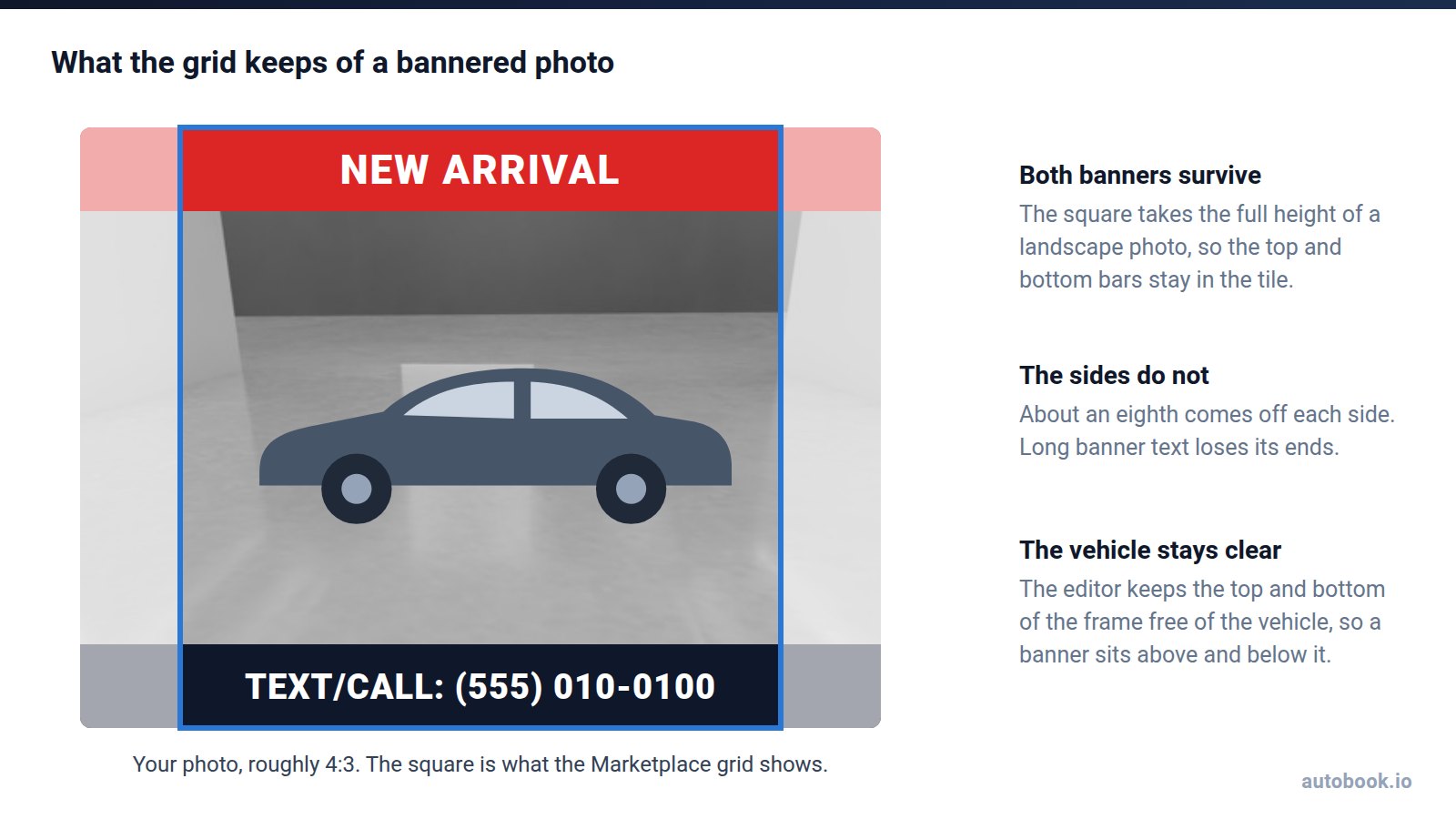
Then there's the crop. The editor's output is roughly 4:3, landscape. The Marketplace grid shows a square from the middle, which keeps the full height of the photo and trims the sides. Both banners survive the crop; the ends of a long one don't. Keep the text short and it stays in the tile. The editor also keeps the top and bottom of the frame clear of the vehicle, so a medium banner sits above and below it rather than across the bodywork.
Will Facebook flag an AI-edited car photo?
Almost certainly not. Meta's "AI info" label is a disclosure it applies by reading provenance data inside the image file, and Meta says labeled content stays up. What gets a vehicle listing pulled is misrepresenting the vehicle, which is exactly the list of edits above that you don't make.
When should you use the free editor, and when the AI Image Processor?
The free editor is the same AI that runs inside autobook.io, one photo at a time. Inside the product it's called the AI Image Processor, and it's built for whole units rather than single photos.
| Free editor | AI Image Processor, in autobook.io | |
|---|---|---|
| Photos per run | One | Every exterior photo of a unit, up to 6, or only the best one. You choose |
| Cost | Free: 9 previews and 3 full-quality photos a day | 2 credits an image, about $0.40 at top-up prices ($20 per 100 credits) |
| Account | None for the preview. An email for full quality | An autobook.io plan, from $99 a month |
| Queue | Behind paying customers | Customers first |
| Interiors and close-ups | Turned away | Skipped, and not charged |
| Rooms and banners | White studio or Turntable, plus banners | The same |
| Afterwards | You download the photo | You review every photo against its original and keep or undo it. Kept photos post with the unit |
Run three exteriors through the processor and a unit costs 6 credits more, about $1.20. It never runs on its own: you pick the vehicle and the photos, which is how it should be. On a $9,000 trade-in parked in a crowded row, that's an easy call. On a truck you already shot against a treeline, skip it.
The rest of the listing is the part the free editor does not do. autobook.io imports the unit from your dealership's website with its photos, writes an editable description, and posts it to Marketplace from your own profile, in your own browser. You still answer the buyers.
What should a free car photo editor do?
Hold any editor to the same five tests, including this one:
- It keeps the vehicle you have. Wheels, badges and lettering should come back exactly as they went in. Ours re-renders that vehicle, modifications included.
- It removes the plate and the dealer frame. Ours does when it detects them.
- It shows you a result before it asks for anything. Ours previews with no sign-up and asks for an email only for the full-quality photo.
- It refuses photos it shouldn't touch. Ours turns away interiors, close-ups and photos without a whole car in them.
- It tells you its limits up front. Ours: 9 previews and 3 full-quality photos a day, and paying customers go first.
If a tool passes all five and the output looks like your vehicle on a better day, use it. That's the whole standard.
Frequently asked questions
Is the AI car photo editor really free?
Yes. You get 9 free previews and 3 full-quality photos a day, with no account. The full-quality photo asks for an email.
Can it edit interior photos?
No, on purpose. It turns away interiors and close-ups before rendering anything. Buyers want to see the real interior, wear included.
Does it remove license plates?
It removes the plate and the dealer plate frame when it detects them. Check the result, because a plate it misses stays.
Can I use my own background?
No. There are two rooms to choose from, White studio and Turntable.
Can I put my phone number on the photo?
Yes. The bottom banner takes up to 32 characters, enough for "TEXT/CALL:" and a number. Keep prices that differ from the listing and any payment or down-payment terms off the photo.
Are edited car photos allowed on Facebook Marketplace?
Editing the scene is normal presentation work. Editing the vehicle is misrepresentation. Keep the photo true to the unit's actual condition, since listing accuracy is your responsibility under Facebook's Commerce Policies.